
Yes, WordPress is suitable for an industrial website, provided it's implemented with the correct architecture and hosting. The selection priorities should be performance, technical compatibility, and active support from the author, not just the demo design. The next step is concrete: open two or three demos of industrial themes, check their version and update date, and verify that they work with your page builder before purchasing anything.
What to look for in a WordPress theme for industry
A theme designed for manufacturing isn't distinguished by its corporate colors, but by the pre-built templates it includes. If you have to build a services page or product datasheet from scratch, you've made the wrong choice.
These are the sections that a serious industrial theme should include from the factory:
- Service template with structure for manufacturing processes, capabilities, and certifications.
- Portfolio or gallery of projects with filters by sector or type of machinery.
- Product data sheets with space for specifications, PDF downloads and drawings.
- Request for Quotation (RFQ) form differentiated from generic contact.
- Customer or distributor section, common in industrial b2b sales models.
One-click import demos save days of work, but only if the sample content resembles what you're going to publish. A demo theme for a "restaurant" disguised as an industrial theme won't work, even if the name suggests it.
Compatibility with builders like Elementor and WooCommerce deserves separate attention. Many industrial themes promise full compatibility but, in practice, force you to install five or six additional premium plugins just to make the demo look like the screenshots. This plugin overload, known as plugin bloat, is the most common cause of slow industrial websites.
Before deciding, also check these author reliability indicators:
- Date of the last theme update (avoid anything unchanged for more than a year).
- Number of active installations, as a reference for actual adoption.
- Author support forum: see if they respond and how long it takes.
- Recent ratings and comments, not just old reviews on the listing.
Professional advice: Run the demo of the theme by PageSpeed Insights Before you buy it. If the author's official demo already scores poorly on mobile, your version with real content will perform even worse.
Where to find reliable industrial topics
In wordpress.org You'll find free themes with code audited by the WordPress review team and a public version information sheet. The theme Industrial Manufacturing, For example, it is in version 0.8.8, was updated on August 25, 2026 and has over 90 active installations. Industrial Hub It follows a similar pattern: version 2.1.1, updated on June 5, 2026, with demos geared towards industrial businesses. There's also Industrial Lite, a lighter option with various customization possibilities, useful when the project is small and doesn't require all the features of a premium theme.
The premium marketplaces ThemeForest, TemplateMonster, and ThemesPride offer a wider variety of demos, paid commercial support, and licenses that include updates for a specified period. However, their code doesn't undergo the same public review as on wordpress.org, so it's advisable to carefully examine the technical specifications before making a purchase.
Whatever the source, always check:
- Minimum PHP and WordPress version required, compared to your hosting.
- Refund policy and duration of support included in the license.
- Does the price cover future updates or just the first version?.
Technical checklist before going into production
A theme might look perfect in the demo but fall apart when it's tested against your actual product catalog. Before moving anything to production, run through this sequence of checks:
- Confirm that the theme supports the version of PHP and WordPress that your current hosting runs, not an older version that no longer receives security patches.
- Measure the demo's performance with Lighthouse or Core Web Vitals metrics, and repeat the test with your own content uploaded to a test environment.
- Activate a content delivery network (CDN) and caching system from the first deployment, not as a later patch.
- Check how many plugins the theme requires to function as in the demo, and consider whether any can be replaced by a native WordPress function.
- Check which APIs and hooks Explain the topic if you are going to connect it to an ERP, a CRM, or a product information management (PIM) system.
- Define a backup policy and environment from the outset. staging to test each update before applying it to the actual site.
A well-configured WordPress site, with an enterprise-grade architecture and managed hosting, can handle complex catalogs and integrations with PIM or ERP systems without compromising performance. The key is to treat caching and frontend optimization as an integral part of the project, not as a last-minute add-on.
Professional advice: Never connect a WordPress plugin directly to your ERP database. Use an intermediary API or integration service: this reduces the risk of downtime and simplifies maintenance when either system is updated.
How to customize an industrial theme step by step
Adapting a beautiful demo to a real catalog of machinery or components is where most projects get stuck. A phased plan avoids the chaos:
- Phase 1, functional demo: Install the theme, activate the demo with one-click import, and browse through all the templates before touching anything.
- Phase 2, actual content: Replace the sample content with product sheets, your own images, and texts of real services, section by section.
- Phase 3, critical integrations: Connect the quote request form to your CRM, and review which fields your sales team needs before closing the form.
For product data sheets, custom content types (Custom Post TypesCombined with Advanced Custom Fields, these offer much more control than forcing the theme to use standard blog posts. Each product can have its own specification fields, without relying on the theme author to have anticipated your exact needs.
The RFQ form deserves its own workflow. Connect it to the CRM using webhooks Or, using Zapier prevents budgets from getting lost in an inbox that no one checks daily. A strategy focused on these reusable elements is preferable to a cumbersome theme loaded with features you'll never use.
Delegating to custom development makes sense when the catalog exceeds several thousand references or when integration with the ERP requires its own business logic. For small catalogs, a good custom fields plugin is usually sufficient. Document every change on the original theme (ideally in a child theme) to avoid losing it in the next update.
Professional advice: Record every code change you make to the topic in a shared document. When the author releases a security update, you'll know within five minutes whether you can apply it without breaking anything.
Hosting and maintenance for a stable industrial website
The theme is only one part of the equation. Without proper hosting, even the best industrial theme falls short as soon as visits from campaigns or trade shows start coming in.
- A managed hosting service specializing in WordPress reduces loading times and usually includes automatic security patches.
- An environment of staging Its own allows you to test each theme or plugin update before touching the production site.
- Automatic backups with retention for several weeks are the only real safety net in the event of an update failure.
- A service level agreement (SLA) with defined response times is especially important if the site generates business leads every day.
Constant website monitoring (uptime, speed, 500 errors) allows you to detect a problem before a potential customer arriving from a paid campaign notices it. It's worth treating this as a recurring task, not something you only check when something has already gone wrong.
How ARTIC works on industrial WordPress projects
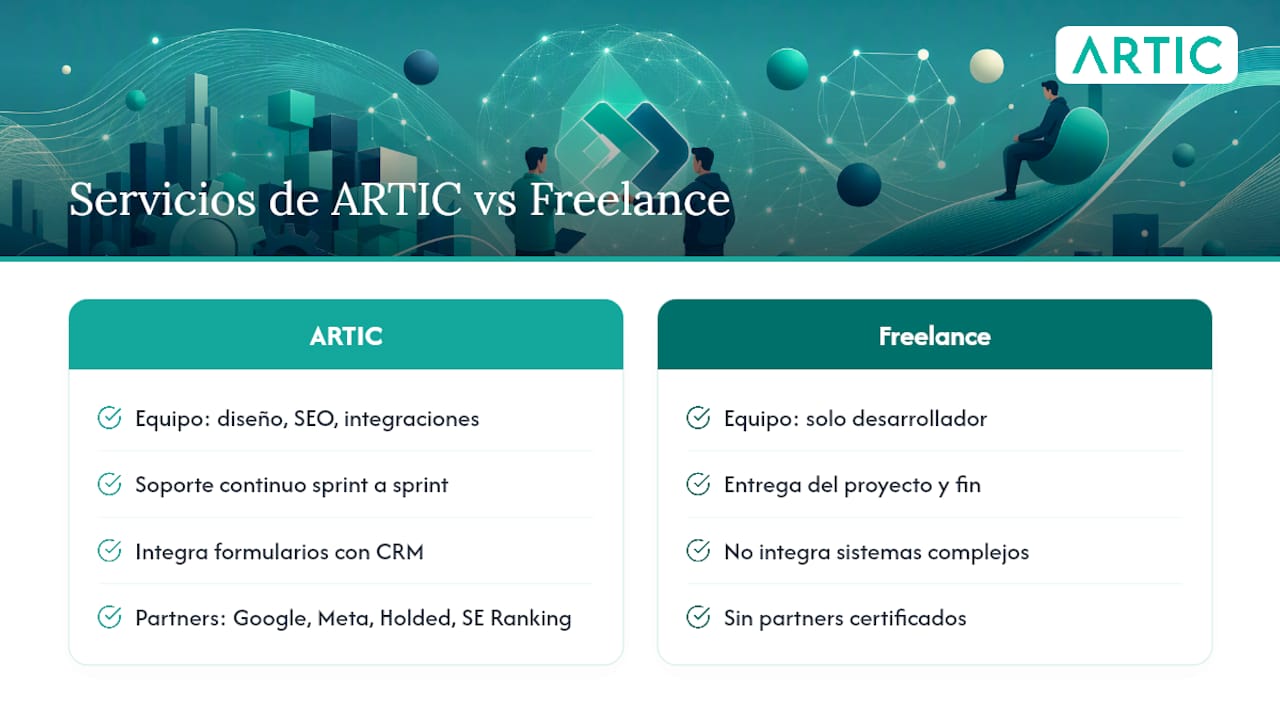
At ARTIC we manage web development projects for manufacturers and the b2b industry using the same model we apply to the rest of our digital services: quarterly planning with clear objectives, bi-weekly sprints, and a dedicated account manager who monitors the project with you, not as a sporadic external provider.
This approach is supported by specific team certifications:
- Certified Google and Meta partner for campaigns and analytics.
- Holded certified partner, useful when the project requires automating site-connected management processes.
- SE Ranking certified partner for continuous monitoring of technical SEO.
An initial audit reviews the current theme (or the one being considered), the hosting architecture, speed, and necessary ERP or CRM integrations. From this, a minimum viable plan is developed: what to build first, what to automate, and what metrics to track in sprint meetings. The goal is not just to launch a beautiful website, but one that generates measurable quote requests each month thanks to effective WordPress SEO automation.
ARTIC services for your industrial website
Beyond choosing the right theme, building a functional industrial website requires custom web design, integration with your management systems, and a technical SEO strategy that makes it visible when a buyer searches for a supplier. At ARTIC, we integrate ourselves as your digital marketing department: we don't just deliver the project and disappear, but rather we monitor performance sprint by sprint with regular meetings and KPIs defined from the first quarter.
What differentiates a project managed by ARTIC from hiring only a freelance developer is the combination: the same team that builds your Corporate web design in WordPress You can then connect the quote form to your CRM, set up technical SEO, and manage lead generation on LinkedIn, all with a single point of contact. We are a certified partner of Google, Meta, Holded, and SE Ranking, and we manage projects in Europe and America using this same working model.
If your current industrial website loads slowly, doesn't generate quote requests, or you simply need to start from scratch with a suitable theme, request an SEO audit to know exactly where to begin.
Official resources for validating topics and practices
Before installing any theme, it's best to consult official sources directly instead of relying solely on marketing screenshots:
- Official fact sheet of Industrial Manufacturing on wordpress.org, with version history.
- Official fact sheet of Industrial Hub, with demos geared towards industrial companies.
- Official fact sheet of Industrial Lite, as a lighter alternative.
- Technical guide on WordPress for manufacturers and enterprise architecture.
- Argument on Why WordPress works for industry, with use cases.
To delve deeper into when WordPress is a better choice compared to other platforms, read ARTIC's article on if your company should use WordPress resolve the most common doubts before taking the step.
Sources
- Industrial Manufacturing | Theme of…
- Industrial Hub
- Why Modern Manufacturing Needs Enterprise WordPress – Pagely
- Why WordPress Is a Smart Choice for Industrial and Manufacturing Websites – Grace Themes
Frequently Asked Questions
Is WordPress suitable for a large industrial website?
Yes, provided it is implemented with managed hosting and an architecture designed for extensive catalogs; when properly configured, it supports integrations with ERP and PIM without losing speed.
What is the difference between Industrial Manufacturing and an Industrial Hub?
Both are free themes on wordpress.org: Industrial Manufacturing is at version 0.8.8 with over 90 active installations, while Industrial Hub is at version 2.1.1 with demos geared towards industrial businesses.
Do I need a premium theme or is a free one from wordpress.org enough?
It depends on the catalog: free themes like Industrial Lite work well for small sites, but a large catalog with many integrations usually needs a premium theme or custom development.
How do I connect an RFQ form to my CRM?
The most common way is by webhooks or tools like Zapier, which send each quote request directly to the CRM without relying on an email inbox.
How long does it take ARTIC to audit and propose a plan for an industrial website?
The first step is an initial audit that reviews the theme, hosting, and necessary integrations; from there, a minimum viable plan is defined within the quarterly planning with bi-weekly sprints.
